EasySub AI

EasySub AI Key Features
EasySub's feature set is lean and purposefully built around its core function of subtitle creation. Here are the standout capabilities that define the platform.
1. AI-Powered Automatic Transcription
The cornerstone of EasySub AI is its automatic subtitle generation. This feature is designed to take a video or audio file and create a full, time-coded transcript in minutes, saving creators countless hours of manual work.
2. Extensive Multi-Language Support
A major differentiator for EasySub is its language support. The tool can transcribe audio in over 100 languages and dialects and offers free subtitle translation into more than 150 languages. This makes it an incredibly useful AI subtitle generator free tool for creators looking to reach a global audience, allowing them to produce videos with bilingual subtitles to maximize accessibility and viewership worldwide.
3. Interactive Subtitle Editor
Once the AI generates the initial transcript, you aren't stuck with it. EasySub provides a simple but effective timeline-based editor. Here, you can easily correct any transcription errors, adjust the timing of subtitle blocks by dragging them on the timeline, merge or split captions, and fine-tune the text. T
4. Direct YouTube URL Upload
To streamline the workflow for YouTubers, EasySub allows you to generate AI subtitles for your YouTube video simply by pasting the video's URL. The platform pulls the video directly from YouTube, transcribes it, and lets you edit and export the subtitles.
5. Multiple Subtitle Format Downloads
For professionals who use dedicated video editing software like DaVinci Resolve or Adobe Premiere Pro, EasySub allows you to download the generated captions in standard formats. It supports TXT, ASS, and, most importantly, SRT files, which are the industry standard for subtitles.
6. Video Export with Burned-In Subtitles
If you want a self-contained video file with subtitles permanently embedded, EasySub can handle that too. After editing your captions, you can export the video with the text burned into the frames. The platform also supports various resolutions and aspect ratios tailored for popular social media platforms like YouTube, Instagram, Facebook, and TikTok.
7. Basic Video Editing Tools
While not its main focus, EasySub is a free video editor online that includes a few essential editing functions. It operates as a non-linear editor, allowing you to trim clips, rearrange their order, and add a custom watermark. These tools are sufficient for basic video assembly but are not intended to replace a dedicated video editing program.
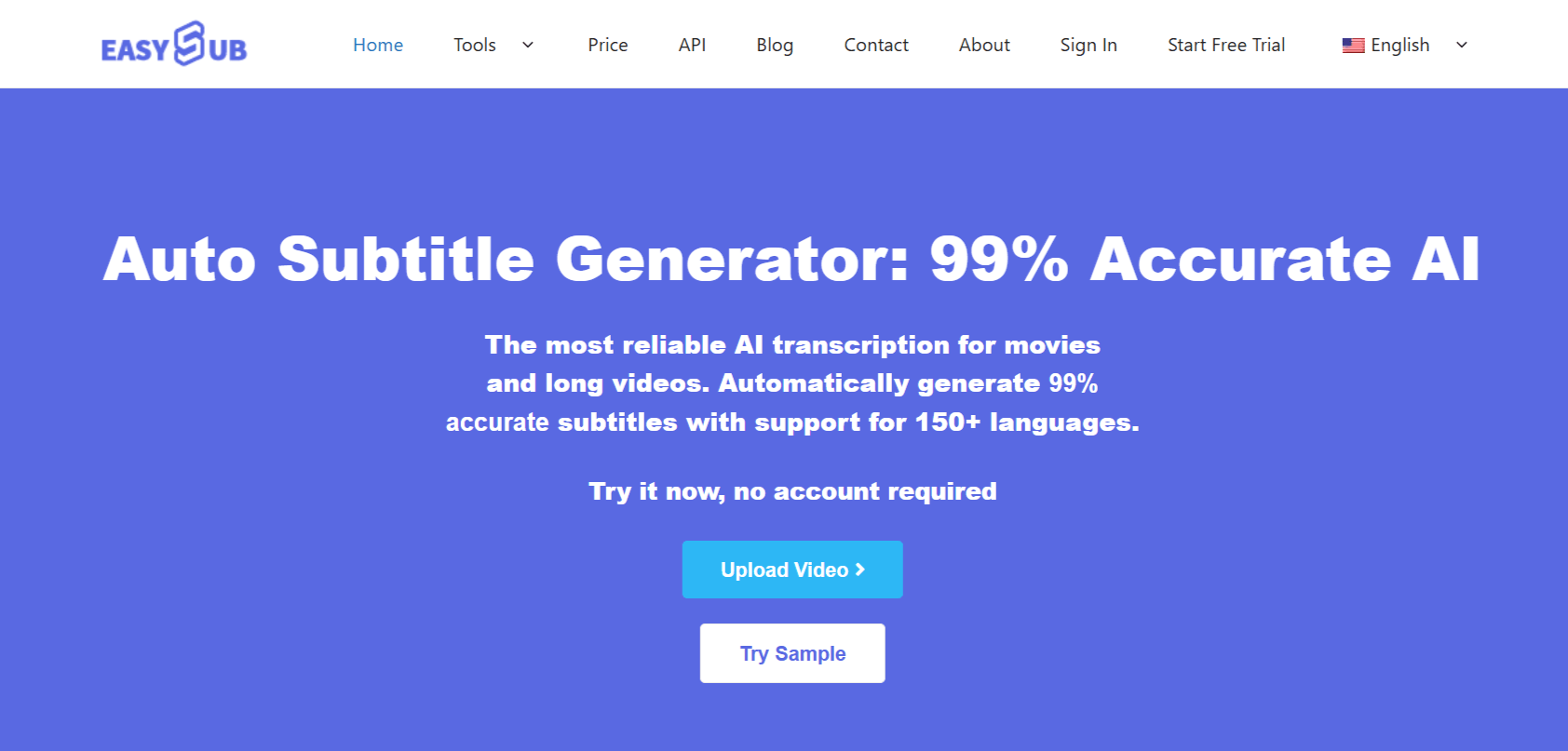
How EasySub AI Works
EasySub prides itself on a simple and intuitive workflow that requires minimal learning. You can get from a raw video file to a fully subtitled final product in just the following few straightforward steps.
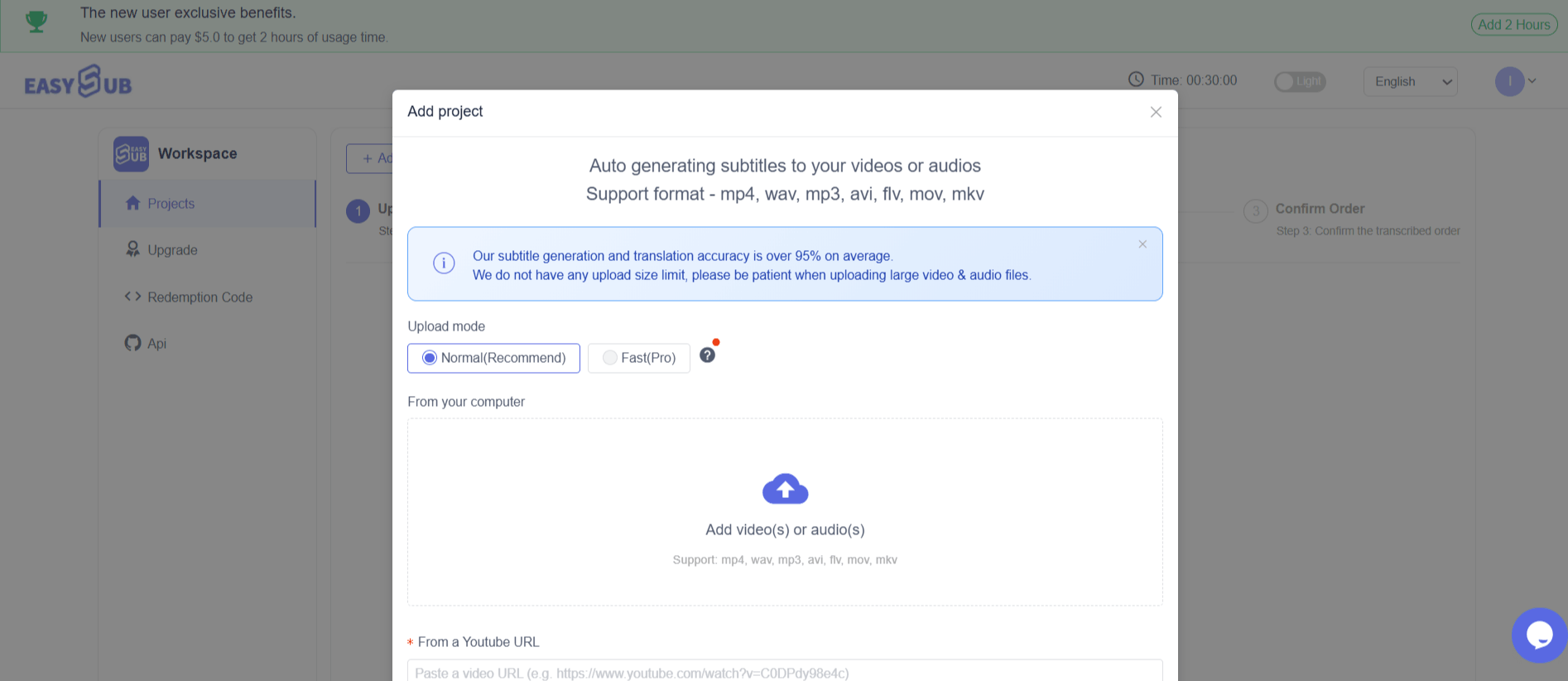
Upload Your Media: You begin by either uploading a video or audio file from your computer (formats such as MP4, MOV, MP3, WAV are supported) or by pasting a URL from YouTube.
Configure AI Transcription: Next, you specify the original language of the audio in your video. This is the language the AI will listen for to create the initial transcription. If you want to translate the subtitles, you can also select your target language at this stage.
AI Generation and Editing: EasySub's AI gets to work, processing the audio and generating a time-coded transcript. This usually takes just a few minutes. You are then taken to the subtitle editor, where you can review the generated text on the timeline, make corrections, and adjust timing.
Download or Export: Once you're satisfied with the subtitles, you have two choices. You can download the subtitle file in SRT, ASS, or TXT format to use elsewhere. Alternatively, you can choose to export the entire video with the subtitles burned in, ready for sharing on social media.
EasySub AI Pricing and Subscription Plans
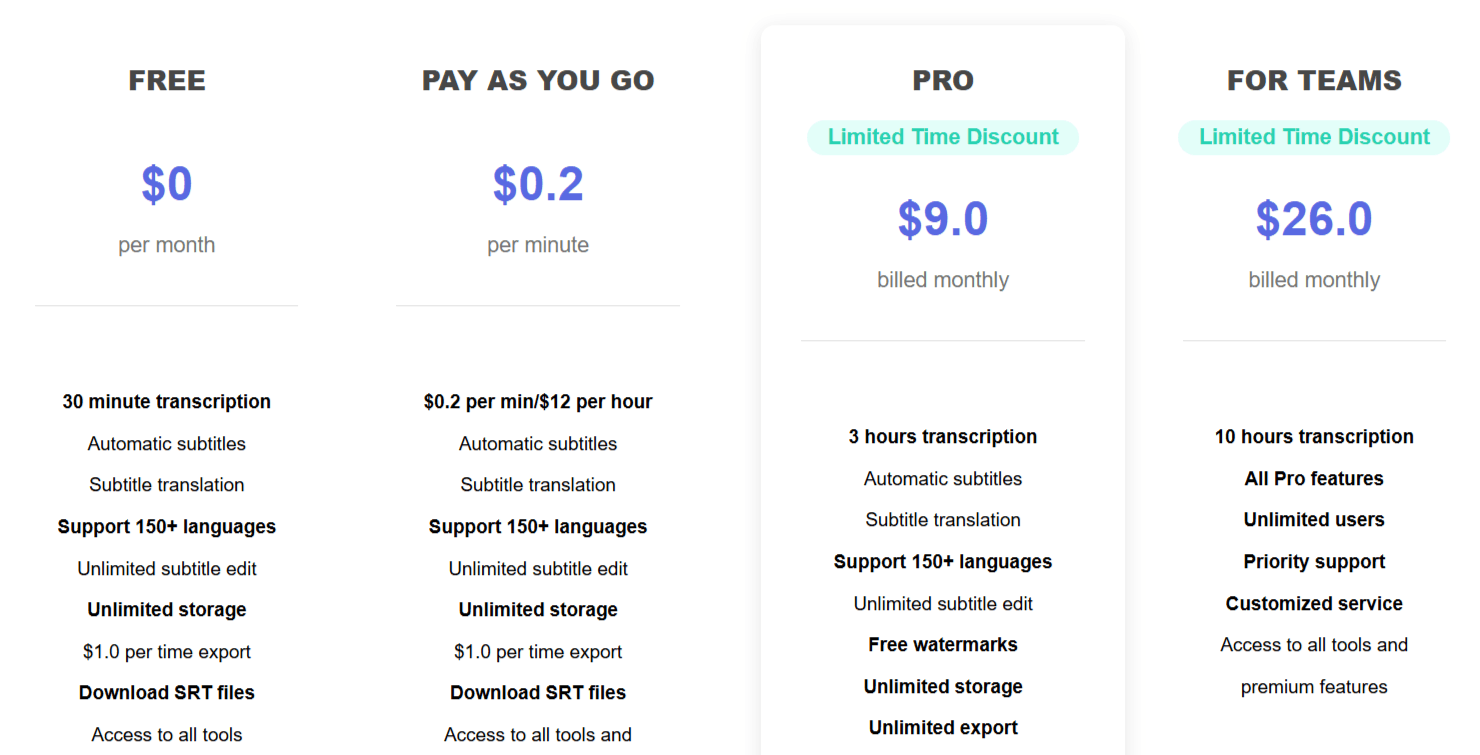
EasySub offers a flexible pricing model that caters to different users, from casual creators to professional teams. The structure includes the following plans.
1. FREE
Price: $0 per month
Includes: 30 minutes of transcription time. It provides access to automatic subtitles, subtitle translation, support for 150+ languages, unlimited subtitle editing, unlimited storage, and allows you to download SRT files. There is a $1.0 fee for each video export.
2. PAY AS YOU GO
Price: $0.20 per minute ($12 per hour)
Includes: All features from the Free plan, plus access to premium features. This plan is ideal for users with sporadic or project-based needs who don't want a recurring subscription.
3. PRO
Price: $9.00 per month (billed monthly)
Includes: 3 hours of transcription per month. It includes everything in the Free plan plus free watermarks, unlimited video exports, customized service, and access to all premium features. This is the best value for regular creators.
4. FOR TEAMS
Price: $26.00 per month (billed monthly)
Includes: 10 hours of transcription per month. It comes with all Pro features, plus support for unlimited users and priority support, making it suitable for agencies and collaborative teams.
Use Cases
EasySub is a focused tool designed for specific workflows where subtitles are a priority. Its user base is diverse but united by the need for fast, accurate transcriptions.
Content Creators and YouTubers: For creators on platforms like YouTube and TikTok, subtitles are key to retaining viewers who watch with the sound off. EasySub provides a quick way to generate subtitles from video for free and increase accessibility and engagement.
Educators and E-Learning Platforms: Teachers and course creators can use EasySub to transcribe lectures and instructional videos, making educational materials accessible to students with hearing disabilities or those who speak different languages.
Social Media and Marketing Teams: Marketers can add clear, accurate subtitles to promotional videos for Facebook, Instagram, and LinkedIn, where a significant portion of video content is consumed silently.
Professional Translators and Subtitlers: These professionals can use the AI-generated transcript as a high-quality first draft, dramatically speeding up their manual proofreading and editing workflow.
Businesses and Corporate Communications: Companies can use it to subtitle internal training videos, public announcements, and webinars to ensure the message is clear to all employees and stakeholders, regardless of their native language.
EasySub AI Pros and Cons
Based on its features and positioning, here’s a balanced look at where EasySub excels and where it has limitations.
Pros
Excellent Subtitling Focus: The tool is dedicated to subtitle generation and translation, resulting in a refined and efficient workflow for its core purpose.
High Accuracy: The tool tries to generate accurate AI subtitles, significantly reducing manual correction time.
Generous Free Trial: 30 minutes of free transcription is enough for users to thoroughly test the service and transcribe several short videos before committing to a paid plan.
Extensive Language Support: With support for over 150 languages for translation, it's one of the most versatile subtitling tools for global creators.
Simple, Clean Interface: The UI is easy to navigate, making it accessible to beginners without any video editing experience.
Flexible Pricing: The inclusion of a pay-as-you-go option alongside subscriptions is a huge plus for users with inconsistent workloads.
Cons
Export Fee on Free Plan: The $1 per export charge on the free plan can be a hurdle, especially for users who want a free subtitle online, with no watermark.
AI Accuracy is Variable: While the claimed accuracy is high, it is heavily dependent on audio quality, clarity, accents, and background noise. Complex audio will still require manual cleanup.
Limited Creative Features: Users looking for transitions, effects, advanced color grading, or extensive text animation will need to use a different tool.
EasySub AI Alternatives
The AI video tool space is crowded, but EasySub's sharp focus on subtitling gives it a unique position. However, if you need more than just captions, several other tools might be a better fit.
Nova AI
Nova AI is a more comprehensive online video editor that also features strong automatic subtitle generation. It's a great alternative if you need both powerful subtitling and a broader suite of editing tools, including templates and stock media libraries, all in one place.
Wisecut AI
Wisecut focuses on automatically editing long-form videos by removing pauses, creating jump cuts, and adding background music. While it includes subtitling, its main draw is smart editing. Choose Wisecut if your primary goal is to shorten talking-head videos quickly.
Vizard AI
Vizard is designed for content repurposing, helping you turn long videos like webinars or podcasts into short, shareable social media clips. It automatically generates subtitles as part of this workflow. It's a better choice if your main task is creating clips for TikTok or Instagram Reels.
Runwayml
Runway is a powerful AI video tool with a massive suite of futuristic features, including text-to-video generation, inpainting, and motion tracking. Its subtitle tool is just one small part of a much larger creative platform. Opt for Runway if you need advanced, generative AI video capabilities.
Adobe Express Video
Part of the Adobe ecosystem, Express Video is a user-friendly, template-driven online editor for creating social media content. It offers a simple auto-captioning feature and is an excellent choice for users who want an all-in-one tool for quick, branded video creation.
Final Verdict and Best For
EasySub is a prime example of a tool that knows its strengths and leans into them. It stands out as one of the best free online automatic subtitle generator tools available.
We score it 8.5/10 for its combination of high accuracy, extensive language support, and a clean, focused interface, which makes the tedious task of subtitling remarkably simple. The flexible pricing, including a functional free tier and a pay-as-you-go option, makes it accessible to everyone.
Frequently Asked Questions (FAQs)
Here are answers to some common questions about EasySub and AI video tools.
Is there any free AI that can edit videos?
Yes, many AI video tools, including EasySub and VEED AI, offer free plans. These free tiers are typically limited by factors like transcription minutes, export resolution, video length, or the inclusion of a watermark. EasySub's free plan provides 30 minutes of transcription but charges a small fee for exporting the final video.
Is there a 100% free video editor?
Truly 100% free video editors without any watermarks, feature restrictions, or export limits are rare, especially for online tools that have server costs. Some open-source desktop software like DaVinci Resolve offers an incredibly powerful free version, but for online convenience, most free plans come with some compromises.
Which is the best free online video editor?
The "best" editor depends entirely on your needs. For generating subtitles, EasySub is arguably one of the best video editors online. For general social media editing, a tool like Descript or DaVinci Resolve might be better. For more advanced features, you might look at the free tier of a platform like Runway or FlexClip.
How to generate subtitles for a video for free?
You can generate subtitles from videos for free by using a service like EasySub. The process is simple: upload your video to their platform, select the audio language, and let the AI automatically transcribe it. You can then edit the subtitles for accuracy and download the SRT file for free or export the video for a small fee on their free plan.

EasySub AI Alternatives
View All