AI Baby Video Generator

Baby Video AI Key Features
The platform offers several distinct AI-powered tools that support different creative needs:
Video Generation: You can create videos using three main methods. Image-to-video allows you to upload a single photo and animate it with natural movements. Text-to-video enables you to describe a scene, such as a baby playing in a nursery, and the AI builds it from scratch. You can also use First and Last Frame mode to create smooth transitions between two different images, which is perfect for showing growth.
AI Baby Podcast: This feature turns photos into "talking" baby videos. You can upload a script or audio file, and the AI uses text-to-speech technology to animate the baby’s mouth in over 17 languages and 100 different voice styles.
Future Baby Predictor: By analyzing photos of both parents, the tool generates realistic images of what their future child might look like at various stages, including as a newborn or a five-year-old.
Age Progression: Baby Video AI allows you to upload a photo and see how that person might age from year 1 all the way to 100. It is often used to create time-lapse sequences showing growth over many years.
Baby Cartoon Maker: If you prefer a more artistic look, you can transform photos into cartoon characters using over 16 different styles, such as Disney, Pixar, or Studio Ghibli.
Dancing Baby Videos: You can upload a photo and select a specific dance vibe to generate funny, short clips that are ready for social media sharing.
Baby Name Generator: Beyond visual media, the site includes an AI that suggests 20 personalized baby names based on your preferences for gender, cultural background, and meaning.

Common Use Cases
People typically use Baby Video AI for family entertainment and digital storytelling. It is a popular tool for creating social media content, specifically for platforms like TikTok, Instagram Reels, and YouTube Shorts. Parents often use the "growing up" templates or age progression tools to document milestones and growth timelines. Additionally, the future baby predictor serves as a fun way for couples to visualize their future family.
Here are some use cases you may consider:
You can produce dynamic social media content for platforms like TikTok and Instagram by turning photos into dancing babies or artistic cartoon characters.
Parents can document milestones and growth by using specialized tools to create smooth transformation sequences or time-lapse videos of a child aging.
You can visualize the future by generating realistic images of what a child might look like at various ages based on photos of both parents.
The platform enables creative storytelling by allowing you to generate "talking" baby podcasts with custom scripts or create videos from scratch using text descriptions.
Expectant parents can simplify the naming process by using the AI generator to find personalized name suggestions that match their cultural and stylistic preferences.
AI Bby Video Pricing and Plans
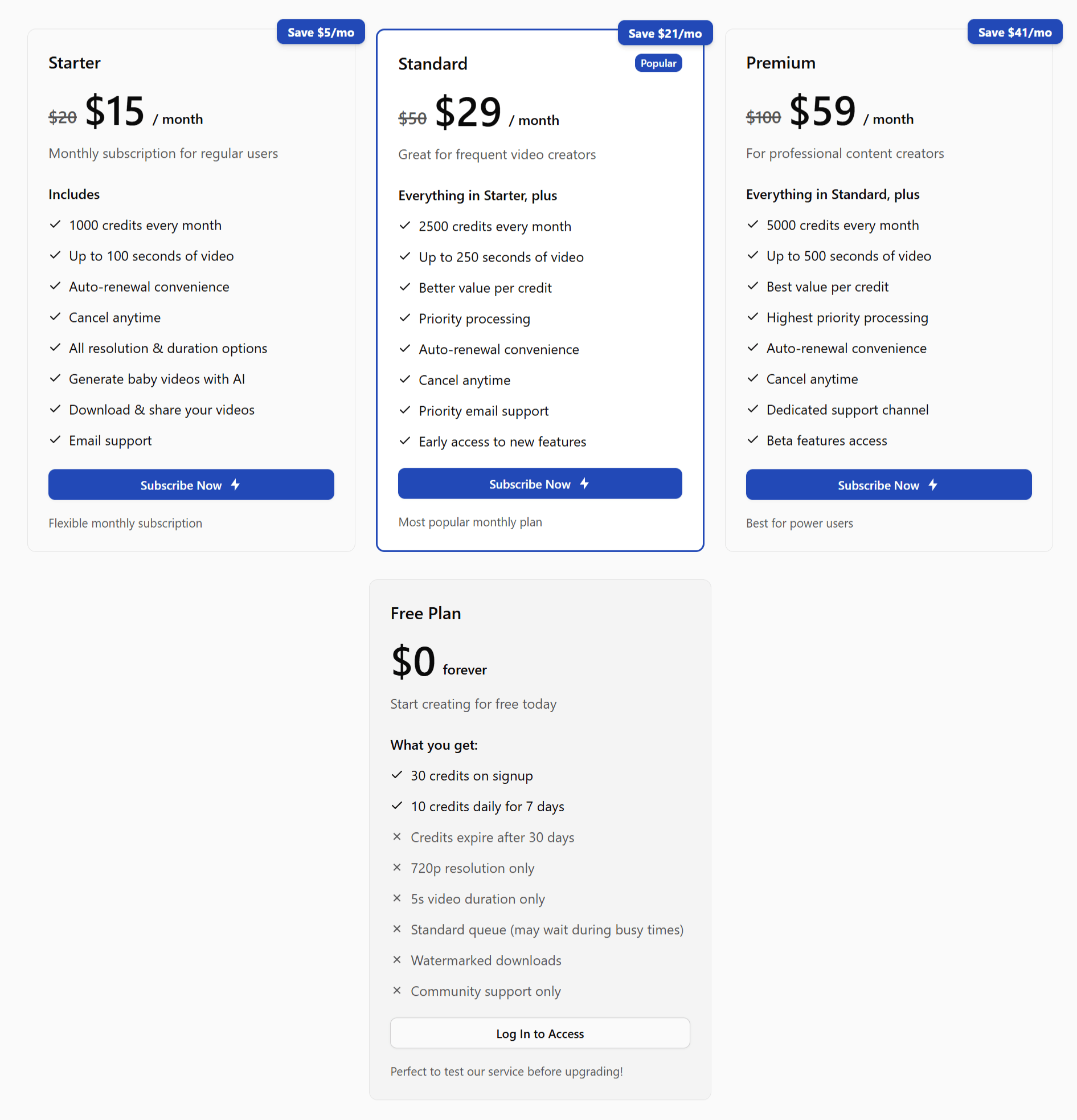
AI Baby Video Generator operates on a credit-based system with several tiers:
1. Free Plan
This is a "forever" free option that gives you 30 credits when you sign up, plus 10 daily credits for the first week. However, videos are limited to 720p resolution and a 5-second duration, and they include a watermark.
2. Starter Plan
The Starter plan costs $15 per month. This plan provides 12,000 credits for the year and removes watermarks. It supports all resolution options and includes priority email support.
3. Standard Plan
At $29 per month. This is the most popular choice. It offers 30,000 annual credits and grants early access to new features.
4. Premium Plan
For $59 per month. Users get 60,000 credits and the highest priority for processing. This plan is designed for professional creators and offers dedicated support.
Pros
Versatility: You get different tools in one place, from video animation to name generation.
Ease of Use: Most features only require a single photo or a simple text prompt to work.
High Quality: Paid plans offer 4K resolution and photorealistic details.
Accessibility: A free plan exists for users who want to test the service before paying.
Cons
Free Plan Restrictions: The free version has watermarks and lower resolution.
Credit Expiration: Credits in the free plan expire after 30 days.
Wait Times: Free users are placed in a standard queue and may have to wait during busy periods.
No API: There is no API support for developers to integrate AI Baby Video Generator into their application
Baby Video AI Alternatives

AI Baby Video Generator Alternatives
View All