
Clueso AI

The Clueso AI tool was born out of the founders' own experiences at their previous startup, Desklamp, where they realized that despite having a solid product, low user adoption was largely due to a lack of clear, engaging educational content. They found that polished videos with animations and voiceovers were necessary for success, but the traditional production time was unsustainable.
Clueso AI was created to solve this by automating the heavy lifting of video production, making it a viable solution for startups, enterprise teams, and anyone else needing to explain complex software interfaces quickly and consistently.
Clueso AI Key Features and Core Capabilities
Clueso AI tool is built around the idea of reducing the friction between a raw screen recording and a final, ready-to-share video asset. The platform packs in several AI-driven features that aim to automate the most time-consuming aspects of video editing, such as cutting, scriptwriting, and visual highlighting.
1. AI-Powered Scripting and Voiceover
One of the most significant hurdles in video production is accurately narrating the content. Clueso takes your raw screen recording, transcribes the audio, and uses AI to refine that into a professional script. Once you approve the script, it generates a studio-quality voiceover that is perfectly synced to the on-screen actions. This saves hours of recording and re-recording voiceovers to get the timing right.
2. Auto-Zoom and Smart Visual Effects
Watching a screen recording of an entire monitor can be difficult for viewers, especially when trying to understand small UI elements. Clueso AI automatically identifies the areas of interest in your recording and applies zoom-in effects to focus the viewer's attention.
Beyond just zooming, you can easily add spotlights, callouts, and other navigational highlights with a single click, ensuring your audience never loses track of the steps being demonstrated.
3. Automated Documentation Generation
Clueso AI video tool goes beyond just video; it understands that users learn in different ways. As you create your video, the platform automatically generates step-by-step written articles to accompany it. These articles include the screenshots and GIFs captured from your video, formatted into a clean, professional guide.
This allows teams to provide both video walkthroughs and traditional help documentation from a single production effort.
4. Branded Templates and Customization
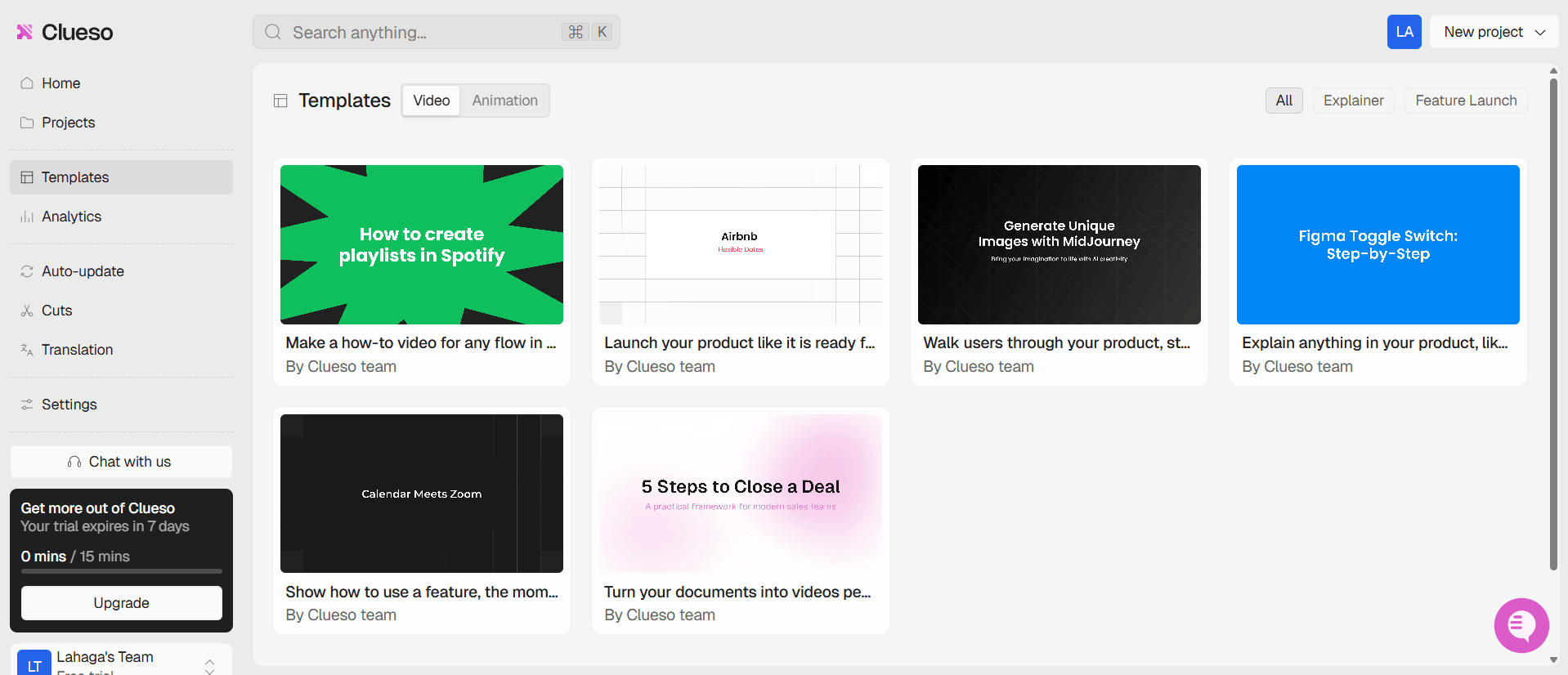
Consistency is key for product marketing and onboarding. Clueso AI provides a robust template system where you can define your brand identity, including specific intros, outros, background music preferences, and color schemes. Once you save them, these elements automatically apply to every video you create, ensuring that your training and demo materials always look like they came from the same source.
5. Multilingual Translation Capabilities
For global teams or products with an international user base, communicating in a single language is often not enough. Clueso AI allows you to translate your videos into over 40 languages. The tool includes a glossary feature that helps you fine-tune technical terms, ensuring that the translation remains accurate and contextually appropriate for the software being demonstrated.
How Clueso AI Works
The user journey in Clueso is designed to be streamlined and efficient, removing the need for traditional nonlinear video editing software.
You start by either recording your screen directly through the tool or uploading an existing raw recording. Once the file is ingested, the AI begins its analysis, transcribing the content and identifying the logical steps within the UI.
After the initial processing, you are presented with a timeline-like interface where you can review the AI-generated script and make any necessary edits. The interface is intuitive, focusing on high-level changes rather than frame-by-frame cutting. If you need to rearrange sequences, add summary slides, or insert external footage, you can do so through a simple drag-and-drop workflow.
The final step is rendering, where the platform stitches everything together into a cohesive, high-definition video.
Clueso AI Pricing and Subscription Plan Structure
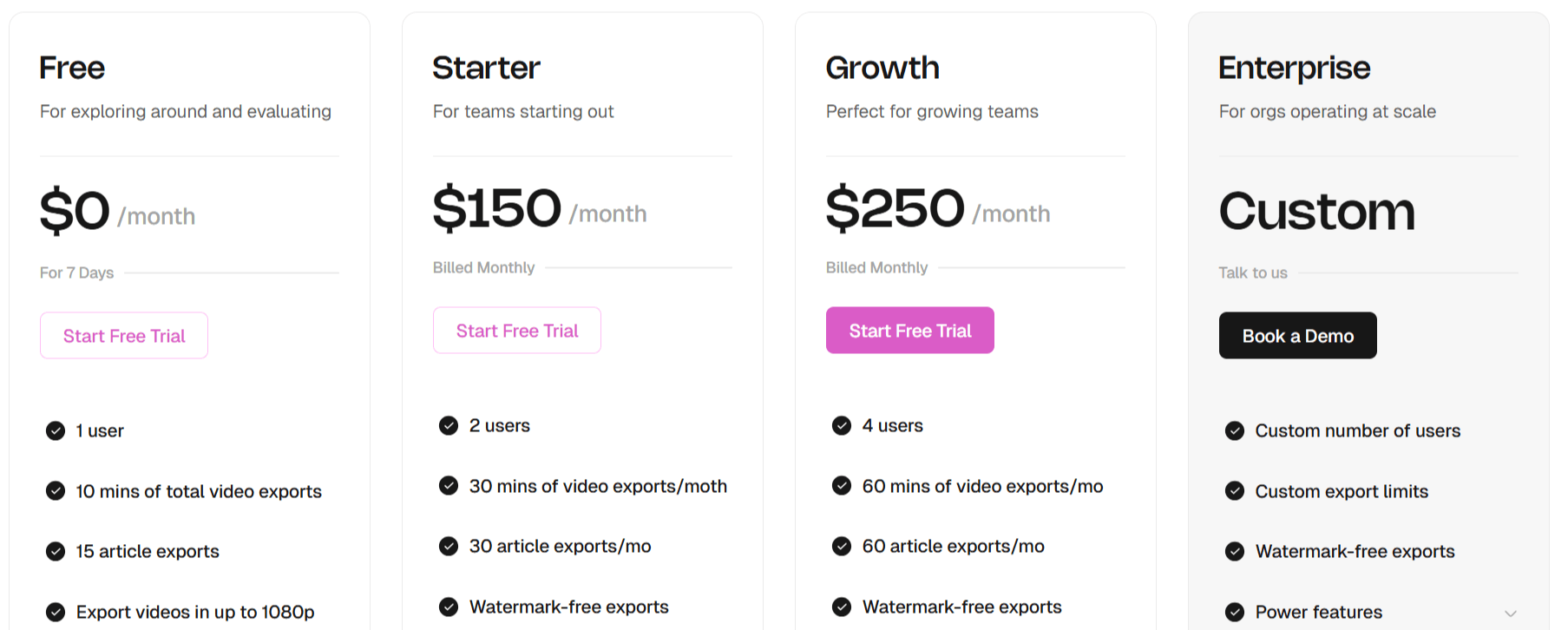
Clueso AI offers four pricing tiers designed for individuals, growing teams, and large organizations:
Free Trial: $0 (7 days)
Best for evaluation. Includes 1 user, 10 minutes of total video exports, 15 article exports, and video export up to 1080p.
Starter: $150/month
Built for small teams. Includes 2 users, 30 minutes of video exports per month, 30 article exports, watermark-free exports, in-app chat support, and up to 2K video resolution.
Growth: $250/month (Most Popular)
Designed for growing teams. Includes 4 users, 60 minutes of video exports per month, 60 article exports, watermark-free exports, in-app chat support, and up to 4K video resolution.
Enterprise: Custom pricing
For large organizations. Offers custom users and export limits, watermark-free exports, advanced admin controls, enterprise-grade security, priority support, and additional power features.
Use Cases
Clueso AI serves several teams, primarily those dealing with complex digital products or software. The ability to churn out content quickly makes it a high-value asset for anyone tasked with ongoing education or marketing.
SaaS Product Teams: Development teams can use Clueso AI to create feature walkthroughs and release announcements, ensuring users immediately understand how to use new functionality without requiring manual support.
Customer Success and Support: Support teams can replace text-heavy help desk tickets with concise, visual video answers that resolve issues faster and reduce the total volume of support requests.
Marketing and Sales Enablement: Sales teams can quickly produce personalized product demos or high-quality video content for prospective clients, helping to shorten the sales cycle by showcasing product value in an engaging format.
Internal Training and IT: Companies can use the tool to create internal standard operating procedures (SOPs) and training videos for employees, making onboarding much more efficient as the business grows.
Freelance Content Creators: Creators who create tutorials or technical content for their audience can use Clueso AI to speed up their production pipeline, allowing them to publish more content without spending their entire week editing.
Clueso AI Pros and Cons
Clueso offers significant utility for teams tired of manual video editing, though it is important to weigh its benefits against the limitations inherent in an AI-automated tool.
Pros
Significant Time Savings: By automating the editing process, users can produce high-quality videos in minutes rather than days, which is a major advantage for busy teams.
Studio-Quality Output: The auto-zoom and animation features provide a professional look that would otherwise require advanced skills in complex editing software.
Integrated Documentation: The ability to create written help articles alongside the video ensures consistent messaging across different media formats.
Low Learning Curve: Because the tool handles the heavy editing, new users can create effective videos with little to no prior video production experience.
Scalable Multilingual Support: Translating content into 40+ languages with a custom glossary is a powerful feature for companies with a global reach.
Branded Consistency: The template system makes it very easy to maintain a professional, unified look across all company-produced media.
Cons
Limited Creative Control: While the AI is helpful, users seeking precise, frame-by-frame control over every pixel may find the automated nature restrictive.
Reliance on AI Accuracy: As with any AI-driven tool, the auto-generated scripts and translations may occasionally require manual oversight and correction, especially for highly technical jargon.
Subscription Costs: For small solo projects, the recurring monthly cost of a paid subscription might be harder to justify compared to using manual, free editing software.
Clueso AI Alternatives and Competitors
There is a growing market for AI-driven video creation, specifically for screen recording and product demos. While Clueso AI excels at automating the production of polished content, there are several other tools worth considering depending on your specific needs.
1. Descript
Descript offers powerful text-based video editing. It is better suited for users who want deep control over their editing and are comfortable spending a bit more time tweaking the final output, whereas Clueso leans more toward full automation.
2. Guidde
Guidde is a direct competitor that also specializes in AI-powered video documentation for software. It is very similar to Clueso in its workflow, making it a strong contender if you want to compare feature sets and UI preferences before committing.
3. VEED
VEED AI is a browser-based video editing tool that includes AI features like auto subtitles, background removal, and quick editing templates. Compared to Clueso AI, VEED is more general-purpose and works better for creators who want both marketing videos and simple screen recordings, rather than fully automated product demo generation.
4. Wisecut
Wisecut focuses on automated video editing using AI to remove silence, add background music, and generate subtitles. It is more lightweight than Clueso AI and is best suited for turning raw talking-head or screen recordings into clean, short videos with minimal manual editing.
5. Riverside FM
Riverside FM is primarily a high-quality remote recording platform for podcasts and interviews, but it also offers AI-powered editing and transcription features. Unlike Clueso AI, it is less focused on product demos and more on recording and repurposing long-form conversations into polished video or audio content.
6. Zebracat AI
Zebracat is an AI-driven video generation tool designed for marketers, business owners, and creators who want to produce compelling social media content quickly.
It automatically handles scripting, media selection, AI voiceovers, and editing, making professional-quality video creation faster, more affordable, and less resource-intensive.
Final Verdict and Best For
Clueso is a highly efficient, well-executed tool for anyone who needs to produce a high volume of product-related videos without a dedicated production team. It hits a sweet spot by automating the most tedious parts of video creation while still allowing enough customization to maintain a professional brand identity.
We rate it an 8.5/10, as it succeeds brilliantly in its primary goal of saving time and improving the quality of educational content.

Clueso AI Alternatives
View All