FireCut

Core Features of FireCut AI
FireCut AI provides a massive suite of tools designed to handle every part of the editing process, from the initial cut to the final social media export.
1. Smart Silence Removal
You can clean up raw footage in just one click.
The tool offers a "Basic" one-slider mode for quick fixes.
For more control, the "Advanced" mode provides a waveform preview and threshold controls.
It allows you to set padding and create J-cuts so the audio flows naturally without sounding choppy.
2. Intelligent Caption Generation
You can generate trendy, animated captions that increase viewer engagement.
The tool supports over 50 languages and automatically adds emojis to your text.
For DaVinci Resolve users, it offers styled Fusion captions with live previews and word-level editing.
You can customize typography, use Google Fonts, and add shadows or outlines to match your brand.
3. Filler Word and Repetition Removal
The AI detects and cuts out "um," "uh," "like," and other common filler words.
It can identify repeated phrases and alternate takes of the same script.
You can review these groups of takes and pick the best one to keep, which is perfect for scripted content.
4. Automated Social Media Shorts
FireCut can scan long-form videos to find the most engaging highlights.
It builds export-ready 9:16 vertical sequences complete with captions and B-roll for TikTok or Reels.
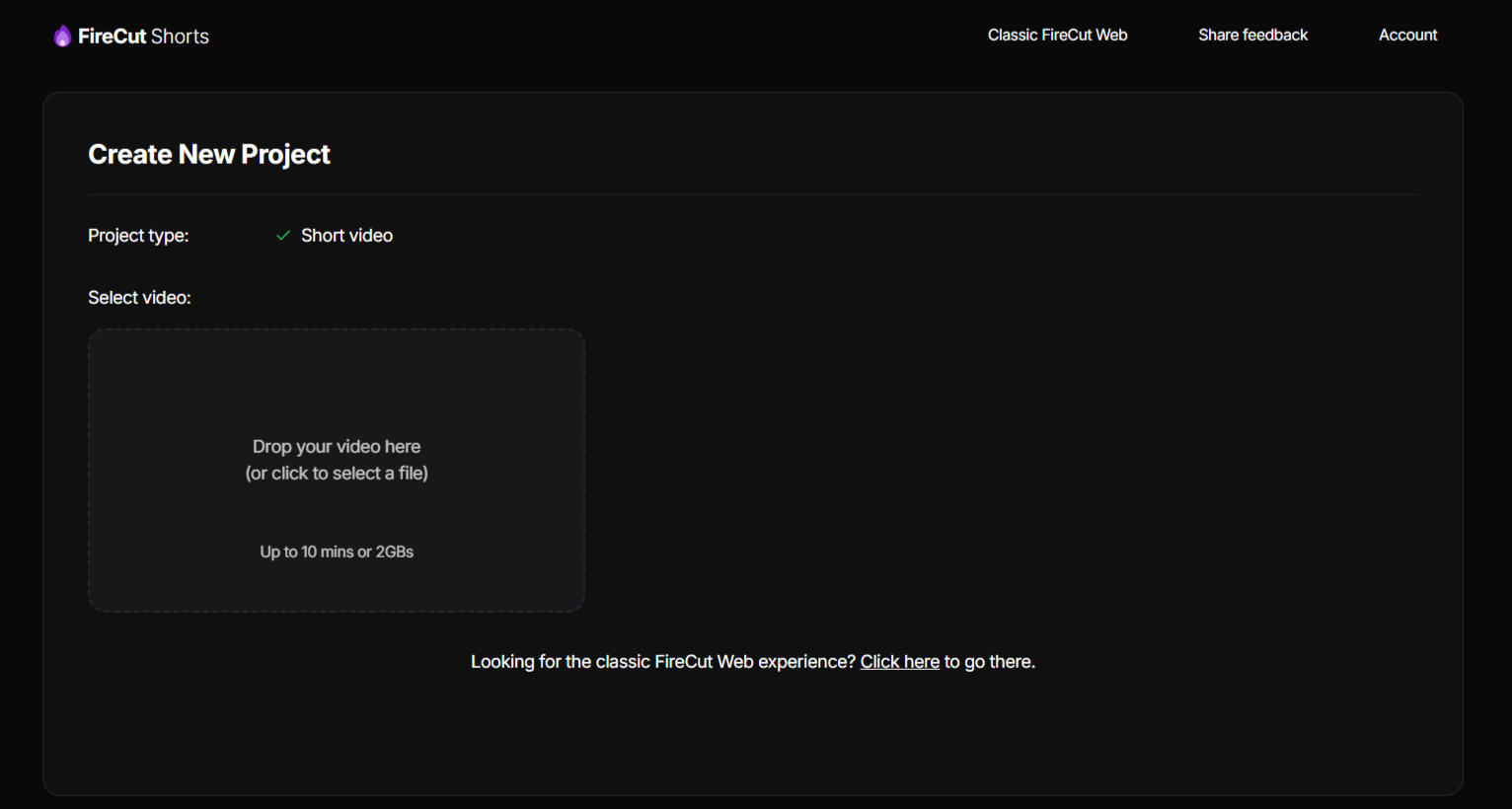
The browser-based "FireCut Shorts" tool allows you to do this without even opening an editor.
5. Podcast and Multi-Track Suite
FireCut automatically switches camera angles based on who is currently speaking.
It can mute quiet audio tracks and split multichannel recorder files into individual mono tracks.
This feature is specifically designed to handle complex interviews and multi-mic setups.
6. Advanced Visual Enhancements
FireCut adds "Zoom Cuts" triggered by key phrases, sentences, or face detection to add depth to talking-head videos.
It features an "Auto B-roll" system that pulls from millions of watermark-free clips via Storyblocks, Pexels, and Pixabay.
The AI can also match royalty-free music to your content's mood by analyzing your transcript.
7. SEO and Organization Tools
The AI detects natural breaks in your video to create chapters for YouTube.
It generates titles, descriptions, and timestamps that you can export directly as markers or Fusion clips.
It includes a profanity filter that can automatically bleep or mute specific words using custom allowlists.
8. AI Speech Generation
You can generate text-to-speech voiceovers directly on your timeline.
The tool gives you control over the voice style, speed, and stability.
It inserts these voices with optional captions already attached.
How FireCut AI Works
Getting started with this plugin is relatively straightforward, as it integrates as an extension within your video editor. Follow this simple process to begin using the tool in your daily workflow.
Step 1: Install the plugin through your Adobe Premiere Pro or DaVinci Resolve extension manager after downloading it from the official site.
Step 2: Open your project file and launch the FireCut panel to sync your media.
Step 3: Select the specific AI task you want to perform, such as "Remove Silences" or "Generate Captions."
Step 4: Adjust the sensitivity settings or thresholds in the plugin UI to match your raw footage quality.
Step 5: Run the process, allowing the AI to analyze the timeline and perform the edits.
Step 6: Review the automatically generated cuts, markers, or captions and make manual creative adjustments as needed.
Step 7: Export your finished, polished sequence from your host application.
Primary Use Cases for FireCut AI
Different types of creators use FireCut in unique ways to maximize their efficiency.
YouTube Content Creators
Creators use FireCut AI software to get a video "90% done" in a fraction of the usual time.
It helps solo YouTubers remove dead air and add chapters to help with search rankings.
The automated zoom cuts keep viewers engaged during long segments of a single person talking.
Professional Video Agencies
Agencies use the Team plan to manage multiple seats and monitor usage across their staff.
The tool has reportedly "more than halved" the workload for some professional editing teams.
It allows agencies to turn around projects much faster, such as finishing 17 edits in a single day.
Podcasters and Interviewers
Podcasters use the multi-track tool to handle camera switching, which usually takes hours of manual work.
It saves an average of 3+ hours per podcast episode by automating the first cut.
The ability to split multichannel audio helps keep large recording projects organized.
Social Media Managers
Managers use the "Shorts" feature to repurpose existing long-form content for Instagram Reels and YouTube Shorts.
The web-based tool allows them to create 25 viral videos per month without needing professional editing software.
They can add sound effects, transitions, and "intro hooks" to boost social performance.
Corporate and Studio Teams
Large companies like Paramount Pictures can use the plugin to remove silences from studio coverage.
Corporate teams use the profanity filter and filler word removal to clean up internal presentations or training videos.
FireCut Pricing Tiers and Subscription Plans
FireCut offers flexible pricing for individuals, agencies, and those who prefer a one-time purchase. All plans typically start with a 7-day free trial.
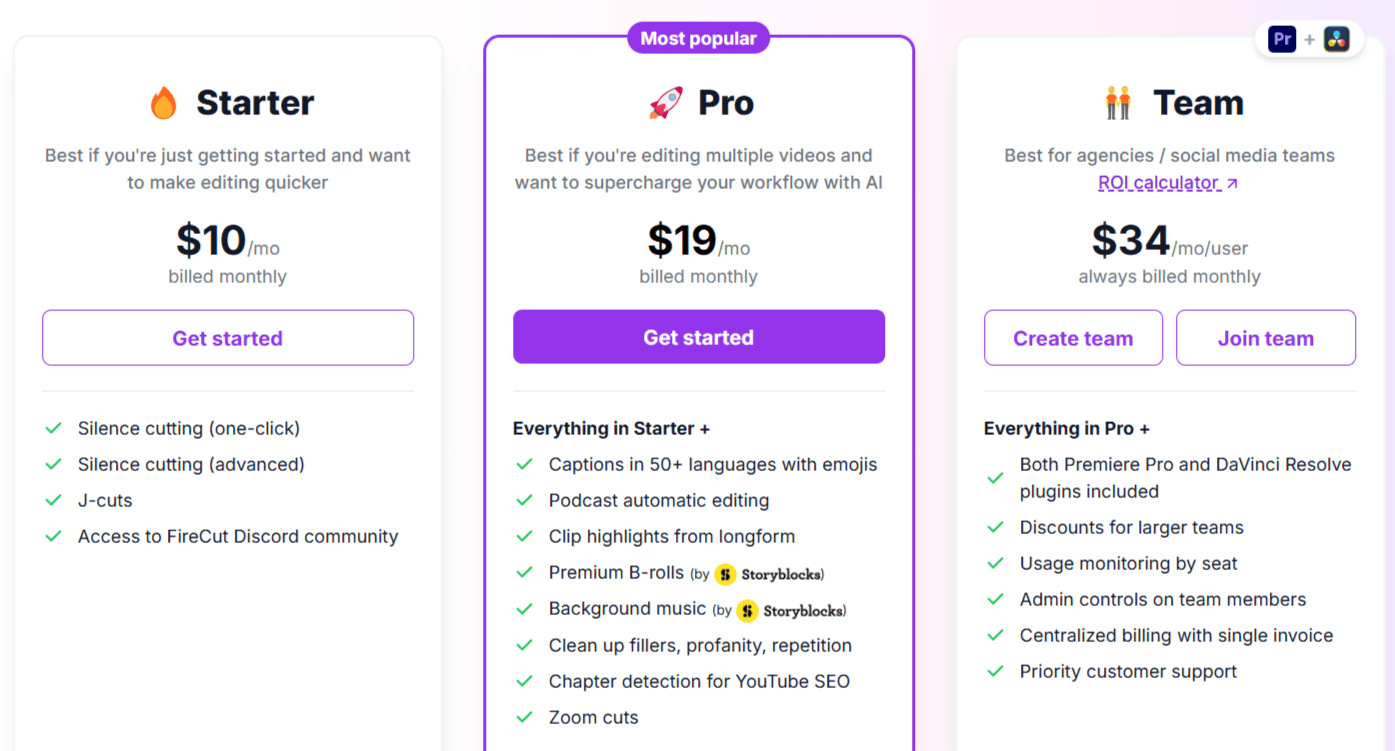
Starter
Costs $10 per month for monthly billing or $6 per month for yearly billing.
Includes one-click and advanced silence cutting.
Provides access to J-cuts and the FireCut Discord community.
Pro (Most Popular)
Costs $19 per month (often discounted to $11) for yearly billing.
Includes everything in the Starter plan plus automated captions in 50+ languages.
Unlocks the podcast editing suite, viral shorts generation, and premium B-roll and music.
Includes 15 to 25 hours of transcription per month, depending on the platform.
Adds chapter detection, filler word removal, and AI voiceovers.
Team
Costs $34 per user per month.
Includes both the Premiere Pro and DaVinci Resolve plugins for every user.
Provides admin controls, usage monitoring by seat, and centralized billing.
Teams get priority customer support and 25 hours of transcription per month.
FireCut Shorts (Web Tool)
Starts at $14.50 per month or $9.50 per month for yearly billing.
Allows for 25 videos per month, up to 5 minutes long each.
Includes premium assets like transitions, sound effects, and audio enhancement.
DaVinci Resolve Captions Only
Costs $7 per month or $5 per month for yearly billing.
Includes professional captioning with typography, animations, and emoji support.
Comes with 8 hours of transcription per month.
Lifetime License
Available upon request through a one-time payment.
This license includes both the Premiere Pro and DaVinci Resolve plugins forever.
It covers all future updates and features added to the software.
Pros and Cons of FireCut AI
Every tool has its strengths and limitations. Here is a factual look at what users experience.
Pros
Massive Time Savings: Users report saving between 3-5 hours per video, allowing them to focus on creativity rather than manual labor.
Native Integration: FireCut app works directly inside Adobe Premiere Pro and DaVinci Resolve, so you do not have to export your files to a different app.
High Versatility: It handles different tasks, from the very first rough cut to adding the final SEO chapters for YouTube.
Rapid Development: The founder and team release updates quickly and frequently build new features based on user feedback.
Global Language Support: It transcribes and captions in over 90 languages, with "excellent" support for many major tongues like French, German, and Spanish.
Top-Tier Customer Service: The responsive support team and the helpful Discord community.
Cons
Subscription Transcription Limits: Most plans limit you to a set number of hours (8, 15, or 25) of transcription per month, which may not be enough for high-volume users.
Platform Requirements: You must use Adobe Premiere Pro 2022 or newer, or DaVinci Resolve; it is not available for tools like Final Cut Pro.
Variable Language Quality: While major languages work perfectly, some are still in "experimental" or "passable" stages and may require more manual editing.
Watermarks on Free Features: If you use the free trial or the web tool for free, features like Storyblocks B-roll and certain music will contain watermarks.
Watermarks on Free Features: If you use the free trial or the web tool for free, features like Storyblocks B-roll and certain music will contain watermarks.
FireCut Technical Specifications and Support
To run FireCut AI, you need to meet a few basic requirements to ensure a smooth experience.
Software Compatibility
Requires Adobe Premiere Pro version 2022 or higher.
Works on both Windows and MacOS operating systems.
Fully supports DaVinci Resolve (both free and Studio versions).
Language Categories
Excellent: Includes English, Spanish, French, German, Japanese, and several others.
High Accuracy: Includes Hindi, Mandarin, Arabic, and Cantonese.
Good/Experimental: Includes Korean, Hebrew, Thai, and Welsh.
Passable: Includes Urdu, Zulu, and Mongolian.
Account and Security
The tool uses cookies to analyze traffic and provide services.
A 14-day money-back guarantee is offered for those who are not satisfied with their purchase.
You can manage your subscription and usage through a centralized dashboard.
FireCut AI Alternatives
If you are looking for other ways to automate your video production, here are several alternatives.
AutoPod
AutoPod is widely known for its ability to automate multi-camera editing for podcasts. It is a direct competitor for editors who focus heavily on long-form interview content.
Timebolt AI
Timebolt AI specializes in stripping silences and boring parts out of videos instantly. It is a great alternative if you only need a specialized tool for quick cutting.
Adobe Premiere Pro
While FireCut is a plugin, Adobe itself continues to bake more AI features into the host software. Depending on your needs, you might find the native tools sufficient.
KwiCut
KwiCut offers AI-based video editing focused on efficiency. It provides a distinct workflow for users who prefer a dedicated AI environment over a plugin.
Nova AI
Nova AI is a web-based editing platform that handles everything from basic trimming to complex captions. It is a strong choice if you want to avoid installing plugins.
Wondershare Filmora
Filmora includes several built-in AI tools for editors who want an all-in-one package. It is better suited for users who don't want to use professional suites like Premiere.
Runwayml
RunwayML is a leader in creative AI tools. While different from a silence-cutting plugin, it is essential for advanced video effects and generative AI tasks.
Sync AI
Sync AI focuses on audio-visual alignment. It is useful for editors who struggle with manual syncing in multi-cam projects.
Final Thoughts on FireCut AI
FireCut AI represents a major shift in how video editing is handled. It takes the most grueling parts of the job, the cutting, the captioning, and the organizing, and hands them over to an intelligent system.
With its many pricing plans, including a free trial and a lifetime license option, it is accessible to editors at every level of their careers.
Frequently Asked Questions (FAQs)
This section addresses common questions from some users exploring whether FireCut AI is a great solution.
Is FireCut AI free?
No, it is a paid product, although it offers a free trial period to test its features. You should be wary of sites claiming a "FireCut AI plugin free download" or "FireCut AI crack Reddit" as these are often security risks.
Is FireCut worth it?
For professional editors or active YouTubers, the time saved usually outweighs the monthly FireCut price. If you edit daily, the investment effectively pays for itself through increased billable hours.
What does FireCut do?
It is an AI-powered plugin that automates tedious video editing tasks like removing silence, adding captions, generating zoom cuts, and finding stock B-roll within Adobe Premiere Pro or DaVinci Resolve.
How do you install a FireCut?
You download the installer from the official website and run it through your editor's extension manager. Once installed, you will need to sign in using your FireCut login to activate your subscription features.

FireCut Alternatives
View All