How AI Video Creators Can Build a Multilingual Content Workflow
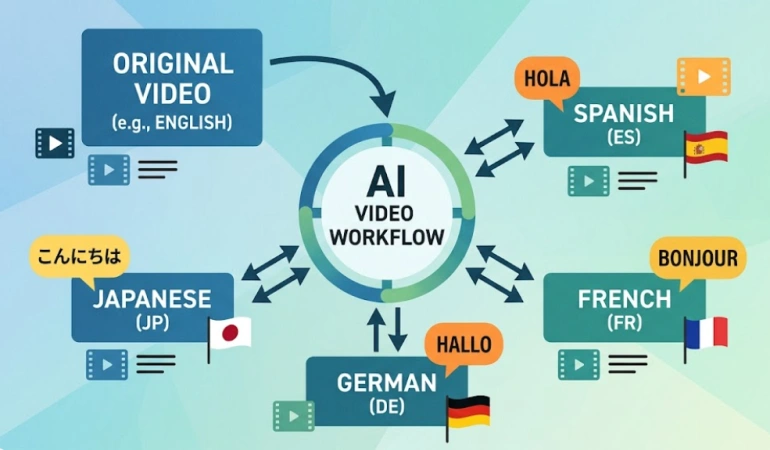
Creating a video in one language is only the first step if you want to reach a global audience. AI video localization can help creators translate scripts, subtitles, voiceovers, and supporting documents into multiple languages without producing every version from scratch. But without a clear workflow, inconsistencies can quickly appear across different versions.
Start with a Clean Original Video
Your localized content needs an original video to build on. If the original isn't great, it affects the quality, message, and delivery of localized versions.
Many AI video generators can now create scenes from text prompts or scripts. If you're using one of these tools, keep your source script simple. Also avoid idioms or cultural references that won't translate well later. This ensures that, no matter how many language translations you need, the meaning and message remain intact.
Use AI avatars if you want a consistent on-screen presenter across every language version, without re-filming. However, make sure the avatar adapts easily across different languages, locations, and audiences. Use a lip-sync feature to match mouth movement to a translated script and dubbed audio.
AI voiceovers help you generate narration in multiple languages from one script. Quality varies widely between tools, so test a few languages before committing to one platform for your whole catalogue.
Transcribe and Subtitle the Video
Use speech-to-text tools to turn your audio into a written transcript. This transcript becomes the base file for everything that follows. Check it for errors and correct any before moving on. A wrong word or missing punctuation here can alter the meaning of the subtitle translation later.
Once that's done, you can use a caption generation tool to time the transcript to the video, frame by frame. Captions that lag behind the speaker are distracting, even if the wording is perfect.
If everything checks out, move on to translating the subtitles. This is where AI video translation tools do the heavy lifting. You can use a machine translation tool to quickly produce a solid first draft. But it still needs a review pass to ensure there are no errors or missing sections.
Translate Supporting Documents
If you work with teams across different locations, you often need to present scripts and other documents in their local language. The translation must also mirror the original document and maintain the formatting to ensure every language version conveys the same information.
Most of these scripts, creative briefs, and product documents are saved as PDFs for easy sharing. Translating PDF documents can be challenging and can delay your content creation process.
That's where a PDF translation tool like Cipher can fit into the workflow. It can be used to translate PDFs, scans, and images while preserving the original document layout. This can be useful when preparing multilingual scripts, creative briefs, product documents, and other supporting materials alongside localized video content.
Keep Terminology Consistent Across Languages
Product names, value propositions, and other elements often take a different form when translated into another language. Your workflow must accommodate these changes and ensure the meaning is preserved, so your brand maintains the same experience across languages.
Including a translation glossary in your workflow solves most of this problem. It's a simple list of your key terms and their approved translations in each language. Share it with every translator or tool involved in your workflow. Without one, you'll end up with three different translations of the same product name across three different assets.
A style guide helps to maintain brand tone across all languages. It tells translators whether your brand is formal or casual. It also helps the translator or tool understand how to handle humour and what to do with idioms that don't have a direct equivalent.
Lastly, establish brand terminology rules for names, taglines, and any trademarked elements. These usually shouldn't be translated at all, but AI tools don't always know that unless you tell them.
Review AI-Generated Translations
AI translation tools aren’t always 100% accurate. They still make mistakes that are easy to miss if nobody checks the output.
Add a human review step to your workflow to catch phrases that are grammatically correct but sound odd or unnatural. A human reviewer can also catch tone or cultural nuance that an AI tool won't flag.
Review names, technical terms, and context. For example, a person's name or a product feature can get mistranslated or altered in a way that changes meaning entirely. Numbers, dates, and units of measurement are also important elements to review, since formats differ from one country to the next.
A short review pass by a native speaker before publishing catches these issues before they reach your audience and gives you enough time to fix them.
Conclusion
A multilingual content workflow needs every piece to move together. This means the video, subtitles, and supporting documents must all convey the same message in all languages. AI video subtitles and AI-generated voiceovers are only one part of the process.
However, for your workflow to scale, your translation must stay consistent. Translation accuracy also affects how the video performs once it’s localized. A poorly localized video can sound unnatural, confuse viewers, or even weaken your brand's credibility in a new market.
Set up your glossary and style guide early, and translate your supporting materials alongside the video itself. The human review steps tie everything together and ensure nothing falls through the cracks. Once everything is in place, you have a repeatable multilingual content creation process, not a one-off project for each new market.
Frequently Asked Questions
Localization can mean more than simply translating words from one language to another. These common questions focus on the parts of localization that matter most when creating and adapting video content for different audiences.
What is localization?
Localization is the process of adapting content for a specific language, culture, and market. It goes beyond translating words by considering things such as cultural references, tone, formatting, dates, units, and other details that affect how naturally content fits a local audience.
What is the difference between localization and translation?
Translation converts content from one language to another while preserving its meaning. Localization goes further by adapting the content to the cultural, linguistic, and functional expectations of a specific market.
Why is localization important for video content?
Video localization helps creators adapt videos for audiences who speak different languages. This can include translating subtitles and scripts, dubbing or generating voiceovers, adapting on-screen text, and making cultural changes so the content feels natural to viewers in each market.
How does AI help with video localization?
AI can automate several parts of the localization process, including transcription, subtitle translation, voice generation, dubbing, and lip synchronization. This allows creators to produce multilingual versions more quickly. However, human review is still useful for checking accuracy, tone, and cultural context.
What is the difference between localization and internationalization?
Localization adapts content or a product for a particular market, while internationalization is the process of designing content, software, or systems so they can be adapted to different languages and regions more easily. In a video workflow, internationalization can mean creating a flexible source script and reusable assets before producing localized versions.

Lahaga Aondowase
Is the founder of AI Video Tools Pro, an AI video tools directory that helps creators, marketers, educators, and businesses discover AI video software. He researches and evaluates AI video tools based on their features, use cases, pricing, and practical workflows.
Related Articles
View All
User Comments (0)

