BigMotion AI

BigMotion AI Features
BigMotion AI is packed with tools to streamline your video creation process:
Multi-Platform Distribution: The faceless video generator automatically posts videos to YouTube Shorts, TikTok, and Instagram Reels, saving you time and effort.
AI Image to Video: BigMotion AI image-to-video feature transforms still images into engaging videos.
AI Talking Avatars: Creates videos with talking characters, perfect for TikTok and similar platforms.
AI Video Script Generator: BigMotion AI software generates scripts for your videos, eliminating writer’s block.
Series Creation: Organizes videos into themed series (e.g., "Interesting History") and auto-generates content for them.
Automatic Video Lineup: Prepares the next video in a series as soon as the previous one is published.
Basic Video Editing: Edit titles, lengths, and background music before posting. Manual script editing is also available.
Adjustable Video Length: Choose between 30-60 seconds or 60-90 seconds for your videos.
Content Filters: This helps prevent inappropriate content, but creators are ultimately responsible for their output.
HD Resolution and Background Music: Videos are generated in HD with background music included.
AI Integrations: Uses ElevenLabs for voice generation and Stable Diffusion for visuals.
Content Preview: You can always preview your videos to ensure they align with your audience.
Automation and Posting: BigMotion does not just make videos; it also distributes them. The software can auto-post your content directly to TikTok, YouTube Shorts, and Instagram Reels. You can link one account per platform to each of your video series. The system uses algorithms to monitor platform rules and automatically adjusts your content to help it reach more people.
Use Cases
BigMotion AI App can be used for:
Niche Poll Videos: Create interactive "Would You Rather" videos for themed series.
Faceless Opinion Polls: Generate videos with AI visuals and voiceovers for engaging polls.
Informational Shorts: Turn facts into short, visually appealing clips with auto-generated subtitles.
Storytelling Snippets: Break down longer narratives into impactful, bite-sized videos.
Motivational Messages: Transform key points from motivational content into inspiring short videos.
BigMotion AI Pricing
BigMotion AI offers three straightforward plans:
Launch Plan: 19/month (1 series and 12 videos).
Grow Plan: 39/month (1 series and 30 videos).
Scale Plan: 69/month (1 series and 60 videos).

All plans include auto-posting, video editing, HD resolution, background music, no watermark, and downloadable videos. The main differences are the price and the number of videos you can create.
Pros
Fully Automated: BigMotion handles everything from scriptwriting to visuals and voiceovers.
Versatility: Works for various content types like ELI5, scary stories, and motivational videos.
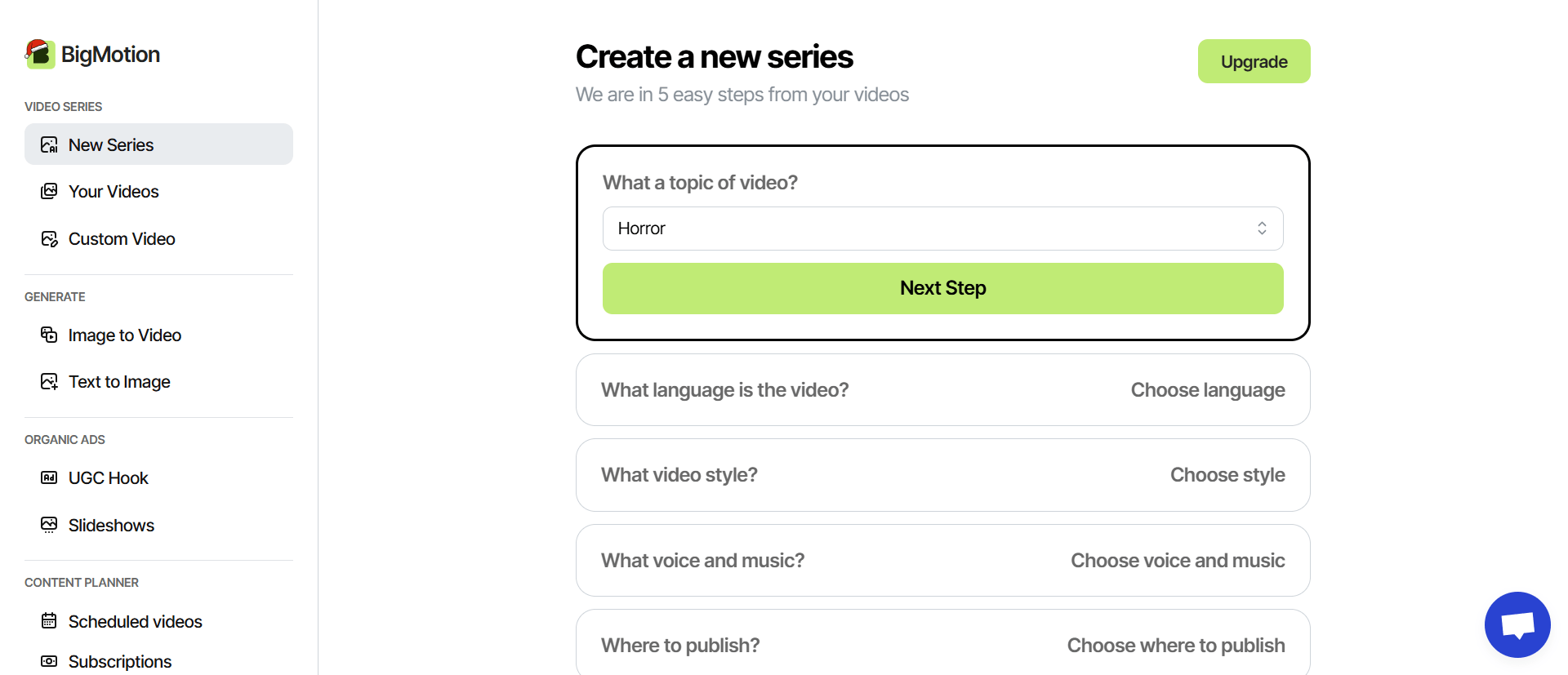
User-Friendly: Simple steps like picking a topic and clicking "generate."
Time-Saving: Automates video creation and scheduling across platforms.
Adaptable: Keeps up with social media platform changes.
Full Ownership: You retain complete rights to your videos.
Advanced AI: Uses ElevenLabs for voices and Stable Diffusion for visuals.
Customizable Edits: Adjust titles, lengths, and background music before posting.
Global Reach: The tool supports most languages, such as English, Portuguese, French, Spanish, Arabic, German, etc., allowing you to target different countries.
Cons
No Free Trial: High computational costs mean no full-featured free trial.
Limited Customization: Only basic edits are available for AI-generated videos.
Content Responsibility: Filters aren’t foolproof; creators must ensure content suitability.
No Refunds: Paid subscriptions are non-refundable.
Account Limitations: Each series can only link to one account per platform.
Length Limits: Videos are currently limited to a maximum of 90 seconds.
Frequently Asked Questions
Let’s answer some questions you might have about BigMotion AI.
How does BigMotion AI work?
BigMotion AI functions as a fully automated system that generates short-form videos from scratch without requiring you to show your face. You start by selecting a topic or creating a "series," a group of related videos based on a specific theme.
The AI then handles everything from scriptwriting and animations to adding captions, voiceovers, and background music. Once a video is generated, the platform can auto-post it across social media networks like TikTok, YouTube Shorts, and Instagram Reels.
Is BigMotion AI worth it?
The platform is designed for users who want to build a consistent income stream with minimal manual effort. It saves time by eliminating manual editing and scheduling, so you can focus on strategy while the AI maintains a viral content routine.
How much does BigMotion cost?
BigMotion offers three primary subscription tiers that can be paid monthly or annually for a 20% discount. The Launch plan is $19 per month (or $16 billed yearly) for 12 videos, the Grow plan is $39 per month (or $33 billed yearly) for 30 videos, and the Scale plan is $69 per month (or $58 billed yearly) for 60 videos.
Is BigMotion AI used for gaming?
Yes, gaming is one of the specific niches supported and highlighted by the platform. You can select a gaming niche, and the AI will create viral shorts tailored to that audience while the user sleeps. It is listed alongside other popular categories like horror, food, and conspiracy theories.
How do I cancel Bigmotion AI?
The cancellation process is straightforward, and you can complete it with a single click. You can manage this through the billing page located on your account dashboard. Once you cancel your subscription, you will not be charged again, though the platform does not offer refunds for previously paid subscriptions.
Who is the target audience for BigMotion AI?
The target audience includes individuals looking to generate passive income, such as stay-at-home parents, social media managers, and small business owners.
It is specifically built for content creators in niches like fitness, tech, and gaming who want to scale their presence on TikTok, Instagram, and YouTube without spending hours on manual work. It serves anyone interested in building a sustainable short-form video business through automation.

"Jeanie’s Trending Motion"
Jeanie Adams
4 months ago
Trending Motion will always do our best to bring you our best.
"How do I get access to to BigMotion AI"
Wantously Nicolas
8 months ago
I just purchased a plan to generate real estate videos to motivate homes buyers in Indianapolis but after I paid I realized that I don't have access to it.
BigMotion AI Alternatives
View All